Practical inbox clean-up guide

How to delete thousands of emails without losing the important ones

Start with the free options. If your inbox is simply too big, here’s a faster way to sort it by sender.

About 9 minutes•Free methods first•Updated 28 September 2026
Before deleting anything

Make every deletion recoverable

Back up genuinely important mail if your provider or email app offers an export. Create folders for messages you must retain, and move those first. During the clean-up, move unwanted mail to Trash rather than deleting it permanently.

Leave Trash intact for a few days. That gives you time to spot a mistake and restore the message. Only empty Trash yourself after you are satisfied the right mail was moved.

Option 1 • Free

Clean the mailbox manually

Best for: smaller inboxes and people who do not mind spending some time sorting
  1. Open your normal webmail and protect or back up anything important.
  2. Search for obvious bulk senders: newsletters, social networks, shopping sites, automated notifications and addresses containing “noreply”.
  3. Delete only groups you can clearly identify as unwanted, starting with older messages.
  4. Search for large messages or attachments if storage space is the main problem.
  5. Move results to Trash, check the folder, then leave it for a few days before emptying it.

This costs nothing and gives you full control. The drawback is repetition: with tens of thousands of messages, the same searches and selections can take a long time.
Option 2 • Free

Use Thunderbird or another desktop email client

Best for: people comfortable managing email software and IMAP

Thunderbird is free and can connect to IMAP accounts such as IONOS. It lets you sort by sender, date or size, search by sender or domain, select large groups and synchronise deletions back to the provider.

For a technically confident user, that can work perfectly well. In our own clean-up, however, accidentally opening messages created more than 1,000 tabs. Thunderbird became unresponsive and had to be force-quit and reset.

That does not make Thunderbird bad software. It is a full email client, while a massive one-off clean-up is a narrower job that can benefit from a more focused interface.

Option 3

Compare specialist inbox-cleaning tools

Dedicated services group or filter large quantities of mail so you can act in batches. Their pricing and limits differ, so check the provider’s current page before buying.

ServicePrice modelAccountsBulk clean-upOngoing subscription?
Clean EmailMonthly or annual; price is displayed dynamically for your locationPlans for 1, 5 or 10 accountsYesYes
MailstromFrom US$9/month or US$59.95/year1 on Basic; 3 on Plus; 20 on ProYesYes
Creyolve IMAP Cleaner£9.99 one-off for 7 daysMultiple compatible accounts during accessYesNo

Pricing checked on official provider pages on 28 September 2026. Clean Email’s free account can clean up to 1,000 messages; its 14-day Premium trial includes 25 unsubscribe actions and requires no card. Mailstrom’s trial loads up to the latest 5,000 messages and allows actions on 25% of loaded mail. Prices and limits can change.

A focused alternative

Our approach: £9.99 for 7 days

If you only have a few hundred emails to sort, your existing webmail or a free email client may be all you need.

Creyolve IMAP Cleaner becomes useful when you have years of accumulated mail, thousands of messages, several accounts or many repeat senders. Its main job is simple: see who is filling your inbox, group their emails together, and clear thousands of unwanted messages without searching for them one at a time.

Amazon1,284 emails
Facebook846 emails
LinkedIn523 emails
Local customer42 emails
  1. Connect a compatible email account and analyse it read-only.
  2. Sort sender groups by message count, size or date.
  3. Protect important senders and select an unwanted group.
  4. Review the selection and confirm the exact number.
  5. Move it to Trash, watch the verified progress, then repeat or connect another account.
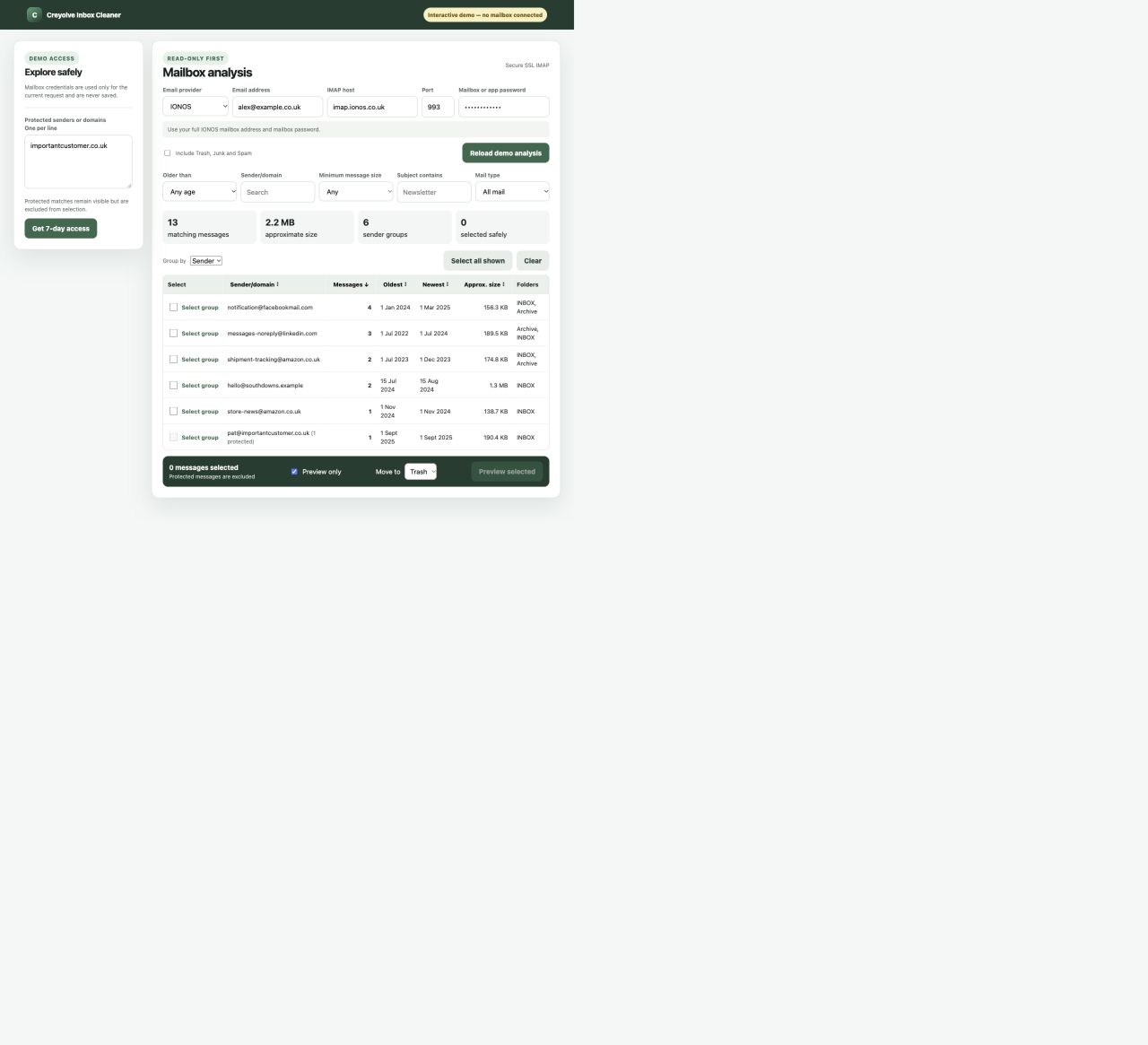
Real Creyolve IMAP Cleaner analysis screen showing selectable sender groups, counts and filters
The real analysis screen groups messages by sender or domain and shows counts, dates, size and folder before anything is moved.

Why seven days instead of another subscription?

Mailbox clean-up is often a job you want to finish, rather than another service you need forever. Seven days gives you time to analyse, review, clean and double-check several compatible accounts. Then access ends automatically.

£9.99 • 7 days • multiple email accounts • no subscription

One payment, no automatic monthly charge and no automatic renewal.

Which option should I choose?

A few hundred unwanted emails

Use your existing webmail. Search by sender, work carefully and keep Trash recoverable.

Comfortable with email software and want completely free

Try Thunderbird and use its sender, date and size sorting tools.

Want an established ongoing service

Compare specialist subscription providers and their current account limits.

Thousands of emails or several accounts

Consider Creyolve’s focused £9.99, seven-day clean-up if grouping by sender would save time.

Frequently asked questions

Will this permanently delete my emails?

No. Creyolve IMAP Cleaner moves only the messages you select to the mailbox provider's existing Trash folder. It never empties Trash, so you can review or restore mail there before you empty it yourself.

Can I clean more than one email address?

Yes. You can connect and clean multiple compatible email accounts during your seven-day access period.

Is this a subscription?

No. It is a £9.99 one-off payment for seven consecutive days of access, with no automatic renewal.

What email providers does it work with?

It works with standard mailboxes that allow password-based IMAP over SSL/TLS. Guided presets cover IONOS, Fastmail, Namecheap Private Email, paid Zoho Mail and DreamHost; a custom option accepts another provider's public secure IMAP host. Gmail, Microsoft 365 and Proton need OAuth, an app password or Bridge arrangements that this password-based connection does not currently provide.

Can I review emails before moving them?

Yes. Analysis is read-only. You can filter and group messages, protect important senders or domains, select groups and preview the exact selection before confirming a move to Trash.

What happens after seven days?

Access to the cleaner ends automatically. There is no renewal charge. Messages already moved remain in your provider's Trash until you restore or permanently delete them using your normal email app or webmail.